Features
Channel Category
The level above your traffic channels – Paid Social, Paid Search, Organic Search, AI Search, Organic Social, Direct, Referral and Other. Compare whole surfaces instead of individual channels, in the Traffic Channel Report and the Report Builder.
A workspace quickly ends up with fifteen or twenty traffic channels. That's the right level for optimising a campaign and the wrong one for the question most budget conversations actually start with: does paid still beat organic?
Channel Category is the level above. It groups every channel into the surface it belongs to, so you can compare eight rows instead of twenty.
The categories
| Category | What lands in it |
|---|---|
| Paid Social | Meta, LinkedIn, TikTok, Pinterest, Snapchat, Reddit, X and other paid social buys |
| Paid Search | Google Ads, Microsoft Advertising and other paid search |
| Paid Other | Paid channels whose brand LeadJourney doesn't recognise – in practice your own custom channels set to Paid Ads |
| Organic Search | Google, Bing, DuckDuckGo, Ecosia and the rest, unpaid |
| AI Search | ChatGPT, Claude, Gemini, Copilot, Grok, DeepSeek and other answer engines |
| Organic Social | Facebook, Instagram, YouTube, TikTok, LinkedIn – unpaid |
| Direct | No referrer: typed in, bookmarked, or a returning visitor |
| Referral | Links from other websites |
| Other | Anything that doesn't fit the above |
Empty categories never appear
You only ever see the categories you actually have traffic in. A workspace with no LinkedIn or TikTok spend simply has no Paid Social row.
In the Traffic Channel Report
Channel Category is the first tab of the Traffic Channel Report, one level above Traffic Channel. Every metric behaves exactly as it does a level down – cost, clicks, leads, CPL, revenue, ROAS – just summed across the whole surface.
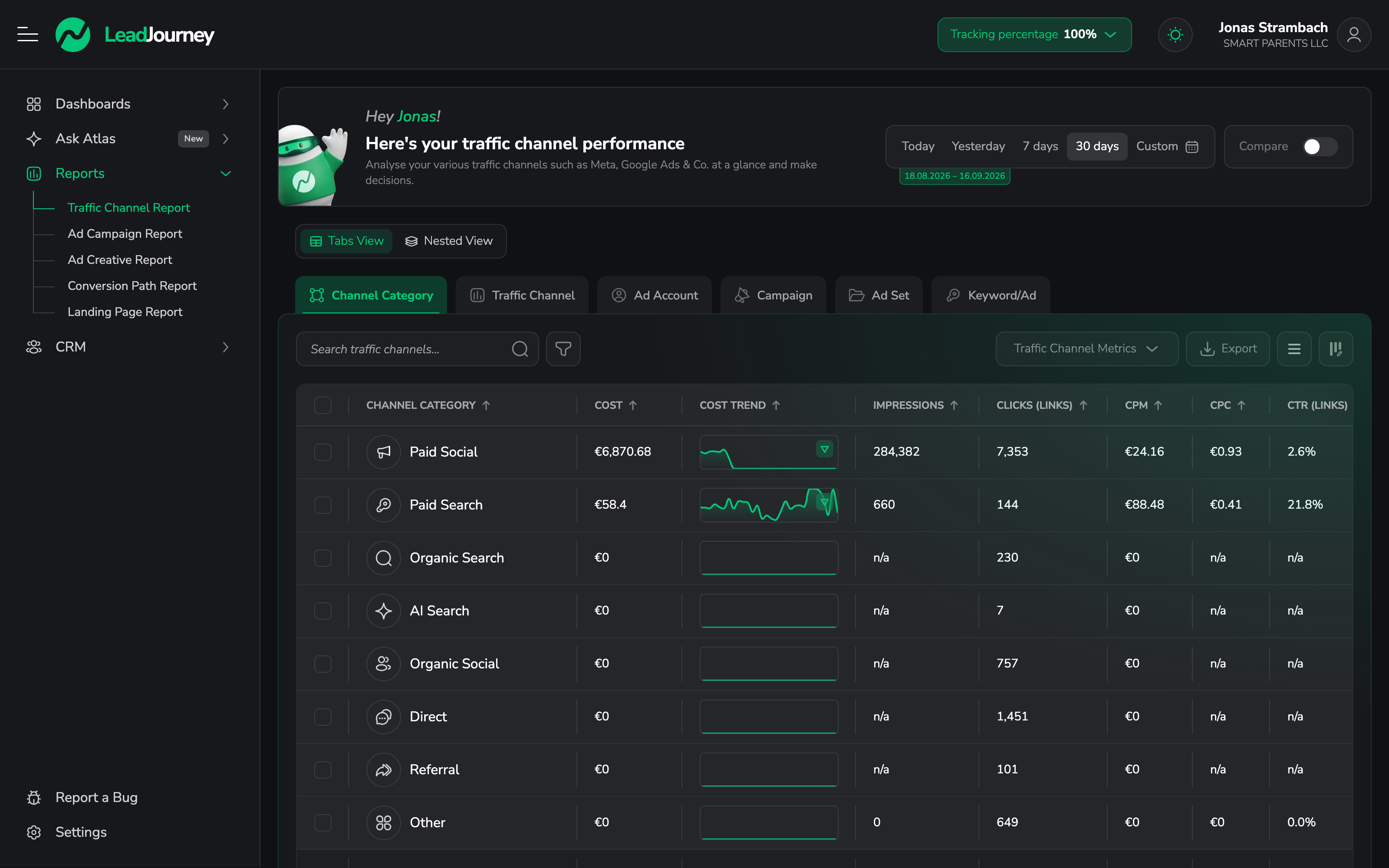
Rows expand in place, so you can open Paid Social and see Meta and LinkedIn underneath it without losing sight of Paid Search next to it. The full hierarchy is now:
Category → Traffic Channel → Ad Account → Campaign → Ad Set → Keyword/Ad
In the Report Builder
Channel Category is available as a grouping dimension in the Report Builder, and there are ready-made templates that use it – Leads by Channel Category, Channel Category Performance, Cost per Lead by Channel Category, Revenue by Channel Category and Won Clients by Channel Category. Each one can be saved to a dashboard like any other report.
This is the level worth putting on a dashboard someone outside marketing looks at. "Paid Social vs. Organic Search vs. AI Search" is a conversation a founder can have; twenty channel names is not.
Your own channels
A built-in channel is classified automatically from its brand. A custom channel can't be –
partner_network tells LeadJourney nothing – so you pick its category when you create it, under
Settings → Traffic Channels → Add Custom Traffic Channel.
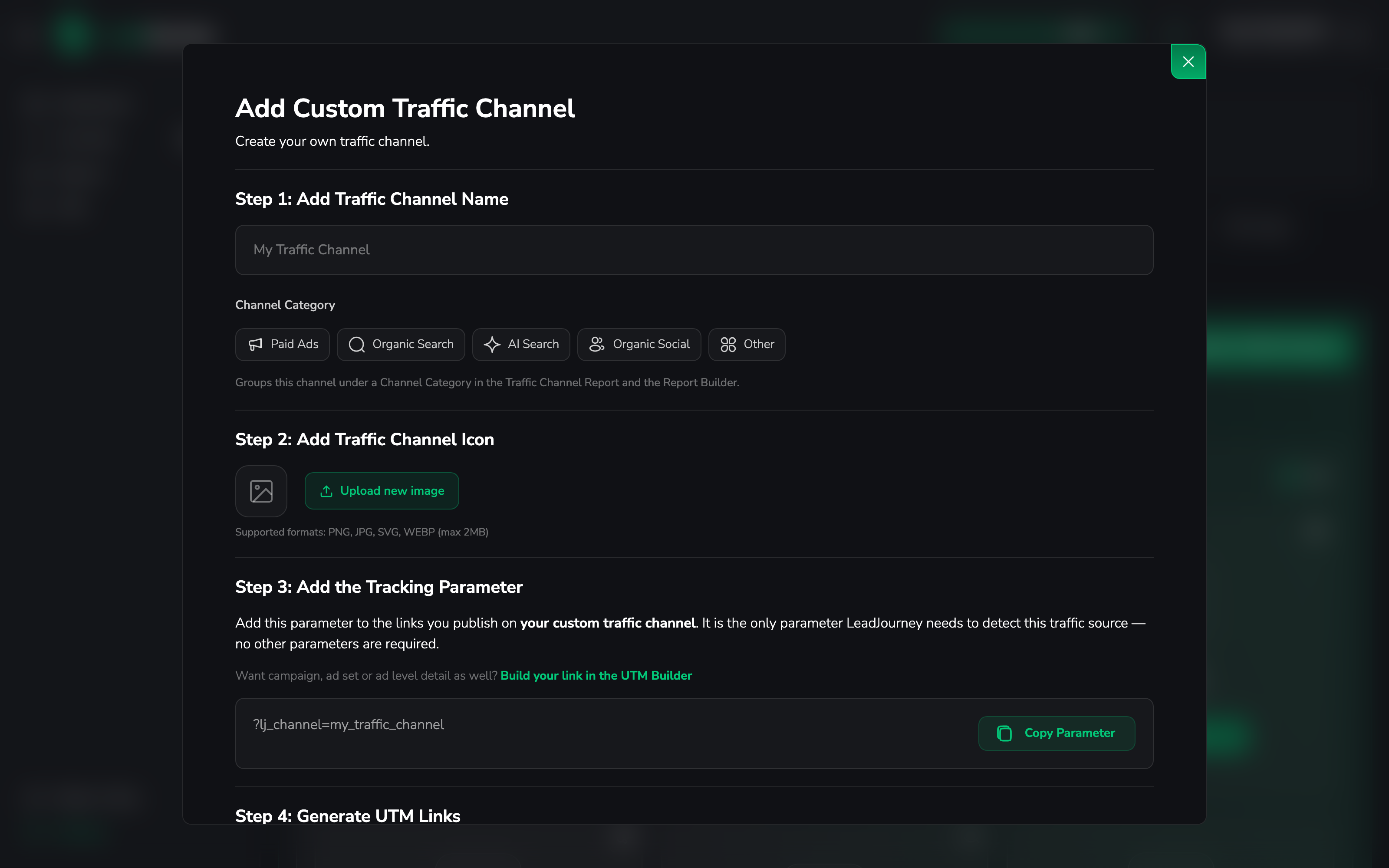
Choose Paid Ads, Organic Search, AI Search, Organic Social or Other. A custom channel without a category reads as Other – never a wrong category, just an unhelpful one.
Paid Ads splits itself
Custom channels are set to Paid Ads, but the report shows Paid Social and Paid Search separately. A custom paid channel whose brand isn't recognisable lands in Paid Other.
Common questions
Related articles
Traffic Channel Report
Compare every paid and organic channel side by side – clicks, cost, leads, CPL, won clients, revenue, ROAS and profit – then drill from a channel down to its campaigns, ad sets and ads to see where your budget works hardest.
Campaign Report
Drill into campaign performance across every channel, then expand campaign → ad set → ad/keyword. Group each level by country, device, OS and more to find the winners to scale and the losers to cut.