Features
Self-reported attribution
Leads often say how they found you — and it rarely matches the click. Turn the "How did you hear about us?" answer into a full attribution method that sits next to your tracked data without changing it.
A lead types "Instagram" into your form. Your click tracking says Google Organic. Both are true: they saw you on Instagram weeks ago and googled your name when they were ready.
Self-reported attribution turns those answers into a real attribution method. It reads the custom field that holds the answer, maps each answer onto a channel, and gives you a Self-Reported method you can read next to — and compare against — your tracked data.
Nothing is overwritten
Self-reported attribution is an extra method, not a correction. Your tracked clicks, campaigns and conversions stay exactly as they are; you simply gain a second lens on the same leads.
Before you start
- A custom field holding the answer, filled by your form — see Custom fields.
- Enough answers to be worth reading. The settings page tells you when there are.
Set it up
Open Settings → Self-reported attribution.
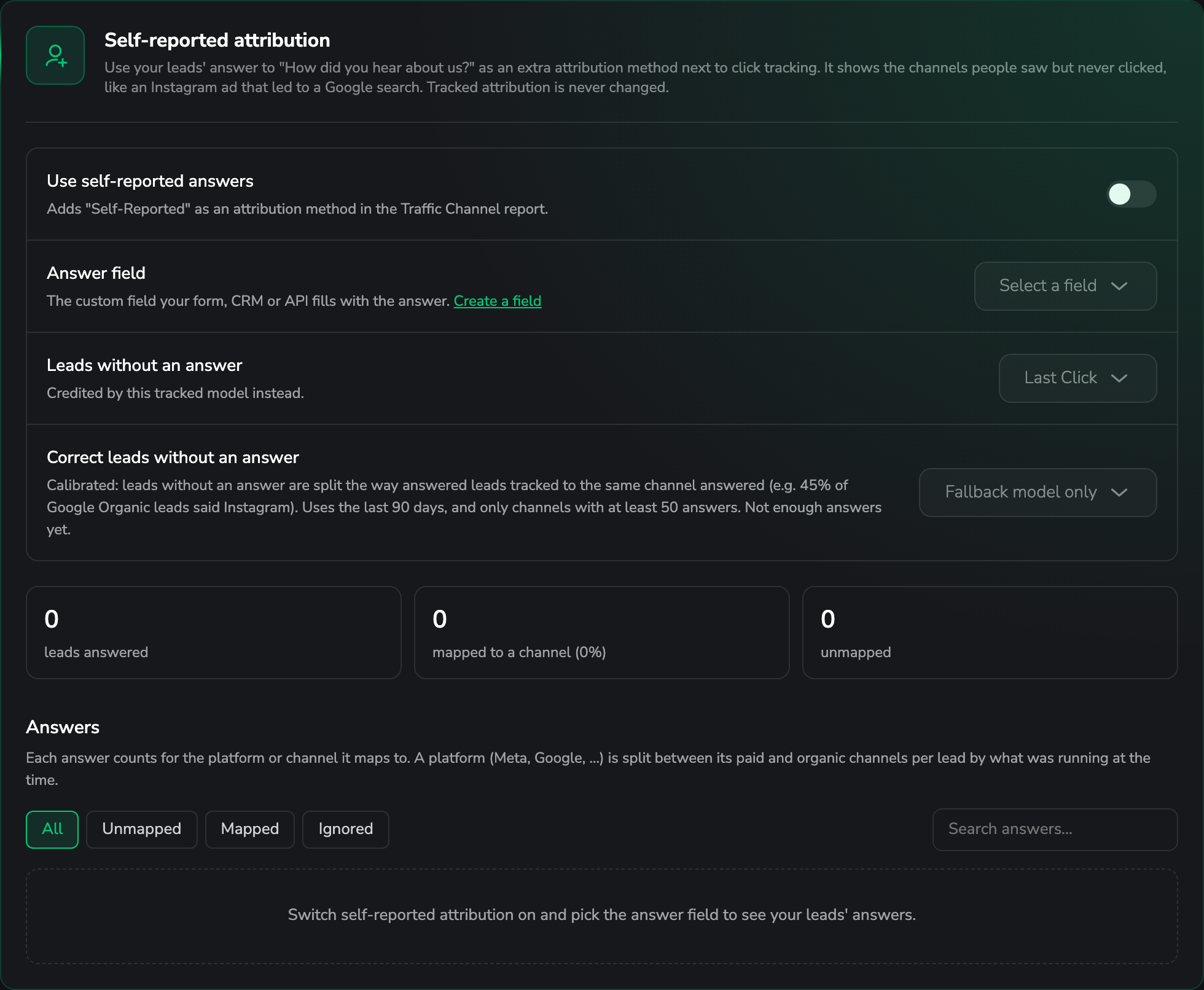
Pick the field with the answer
Choose the custom field your "How did you hear about us?" question writes into, then switch on Use self-reported answers.
Existing leads are filled in afterwards by a background job, so the numbers keep growing for a while after you save.
Map the answers to channels
Every distinct answer your leads gave appears in a list. Map each one to:
- a platform — the answer is then split between that platform's paid and organic channels per lead, which is what you want for "Instagram" when you run both; or
- a single traffic channel, when the answer is unambiguous.
LeadJourney already suggests the obvious ones (insta → Meta) and can suggest the rest with
AI. A mapping you set by hand always wins over a suggestion, for exactly that answer.
Answers can be filtered by All / Unmapped / Mapped / Ignored, and a platform is split between its paid and organic channels by what was running at the time.
The page shows your coverage — how many leads gave an answer and how many of those are mapped to a channel. That percentage is the honest measure of how much the method can tell you.
Decide what happens to leads without an answer
Not everyone answers. Two settings decide how those leads are credited:
- Leads without an answer — the tracked method that credits them instead (Last Click by default).
- Correct leads without an answer — Fallback model only (the default) or Calibrated from answers.
What calibrated mode does
Calibrated splits the leads without an answer the way comparable leads answered: if 45 % of the leads that tracked to Google Organic said "Instagram", the unanswered Google Organic leads are split the same way.
It uses the last 90 days and only channels with at least 50 answers, so it stays off until the data carries it. The page says either Ready: n answers or Not enough answers yet.
Reading it in your reports
Self-Reported appears as an attribution method like any other. The most useful way to read it is next to the tracked one: pick a tracked method, then Compare with → Self-Reported in the Traffic Channel report. Channels whose credit moves most are listed first — that list is usually the most interesting screen in the whole product, because it shows exactly which channel your click tracking under-counts.
The answer itself is also on the lead, so you can see what a specific person typed.
When this is worth doing
- Long consideration cycles, where the first touch is weeks before the click.
- Brand, podcast, word of mouth and offline — channels that cannot carry a click ID and would otherwise hide inside Direct or Organic Search.
- Arguments about platform numbers: a second, independent measurement is the fastest way to settle them.
Troubleshooting
Coverage stays low
Either few leads answer, or many answers aren't mapped yet. The coverage line separates the two. Unmapped answers are the easy fix — use the AI suggestions and map the rest by hand.
Calibrated mode isn't available
It needs at least 50 answers per channel in the last 90 days. Until then LeadJourney uses the fallback model, and says so.
The answers list is empty
The chosen custom field isn't being filled. Check that your form writes into that exact field — see Custom fields.
Common questions
Related articles
Attribution models
All six attribution models in LeadJourney – Last Click, First Click, Linear, Time Decay, U-Shaped and Progressive – what each one credits, when to use it, and the Conversion Window and Attribution Date settings that decide which conversions count and on what day.
Affiliate tracking
Track the offers you promote as an affiliate – the four building blocks (networks, offers, campaigns and landing pages) that let you see true ROI per campaign, offer and network.