Integrations
Connect Affilka
Attribute casino registrations, first deposits, deposits and commission from your Affilka (SOFTSWISS) programs back to the click that sent each player. Connects with a statistic token — no postback to set up.
Connecting Affilka (SOFTSWISS) attributes casino registrations, first deposits, deposits and commission back to the click that sent each player.
What the connection covers
- 6 triggers across registrations, first deposits, deposits and commission.
- No postback to configure — LeadJourney reads your Affilka reports instead.
- Read-only: nothing in Affilka is ever changed.
Before you start
- Your Affilka statistic token (see step 1).
- The program domain you log in to Affilka on.
- Tracking is live — see Install the tracking script.
Where to find it
Open Settings → Apps and click the Affilka card (or use ?slug=apps&app=affilka).
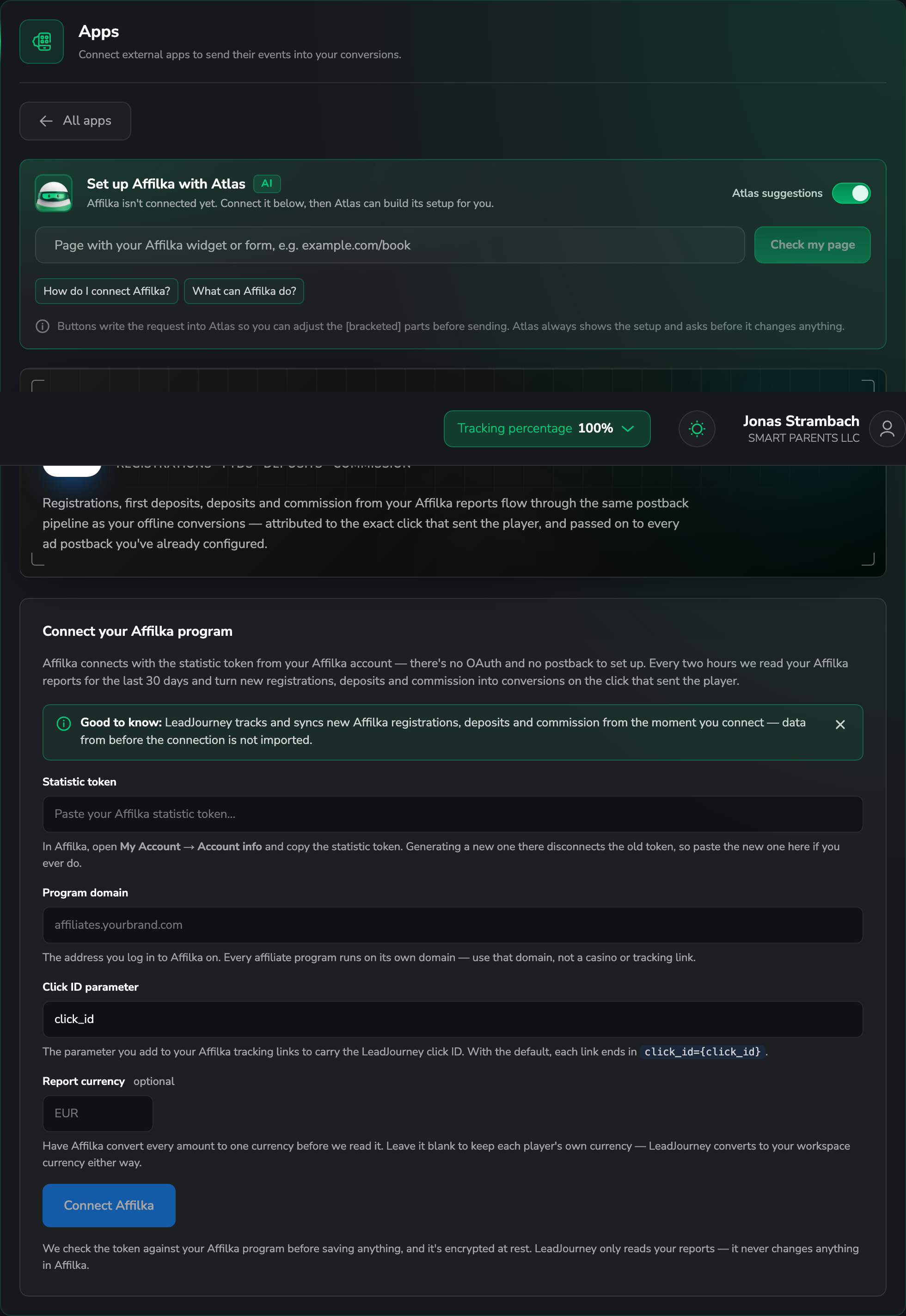
Step by step
Get the statistic token
In Affilka, open My Account → Account info and copy the statistic token.
Generating a new token disconnects the old one
There is one token per account. If someone generates a fresh one in Affilka, the connection here stops working until you paste the new one.
Enter the program domain
Paste the address you log in to Affilka on, e.g. affiliates.yourbrand.com.
Every affiliate program runs on its own domain — use that domain, not a casino URL and not a tracking link.
Set the click ID parameter
Name the parameter you add to your Affilka tracking links to carry the LeadJourney click ID.
The default is click_id.
This parameter is what ties a player back to the click that sent them, so it has to be on the links you actually run traffic to.
Choose a report currency (optional)
Leave it blank to keep each player's own currency, or name one and Affilka converts every amount before LeadJourney reads it. Either way LeadJourney converts to your workspace currency.
Connect and add triggers
LeadJourney checks the token against your program before saving, and stores it encrypted. Then add triggers in the usual three-tab flow to map each Affilka event onto one of your conversions.
Data arrives in two-hour steps
LeadJourney reads your Affilka reports every two hours, for the last 30 days, and turns new registrations, deposits and commission into conversions. It isn't instant, and a correction Affilka makes within that 30-day window is picked up on the next read.
Troubleshooting
The token is rejected
LeadJourney validates it against your program before saving. Check that the program domain is the one you log in on, and that nobody has generated a new statistic token since.
Players arrive but aren't attributed
Your Affilka tracking links aren't carrying the click ID parameter, or it's named differently than configured here. Check one of your live links.
Common questions
Related articles
Connect Swoogo
Connect Swoogo with a consumer key and secret — LeadJourney registers the webhooks for all current and future events. Registrants, purchases and session check-ins become attributed conversions.
Connect Typeform
Connect your Typeform account in minutes. Authorize once, LeadJourney registers a webhook on every form, then give each form an lj_click_id URL parameter so submissions are attributed to the ad that drove them.