Integrations
Connect ChatGPT Ads
Connect ChatGPT Ads with an API key per ad account. LeadJourney syncs campaigns, ad groups, ads and spend, and sends conversions back to OpenAI – including the two keys that look alike but aren't interchangeable.
Connecting ChatGPT Ads syncs your campaigns, ad groups, ads and spend from OpenAI's Ads Manager, and can send your conversions back so the platform optimises on real outcomes.
Unlike most channels, this one connects with an API key per ad account rather than a single sign-in – one key belongs to exactly one ad account.
Before you start
- Access to OpenAI Ads Manager at
ads.openai.com. - Tracking is live on your site – see Install the tracking script.
- The conversion types you want to report back, set up in the Events Manager.
Where to find it
Open Settings → Traffic Channels, find the ChatGPT Ads card and click Connect.
Step by step
Connect an ad account with its API key
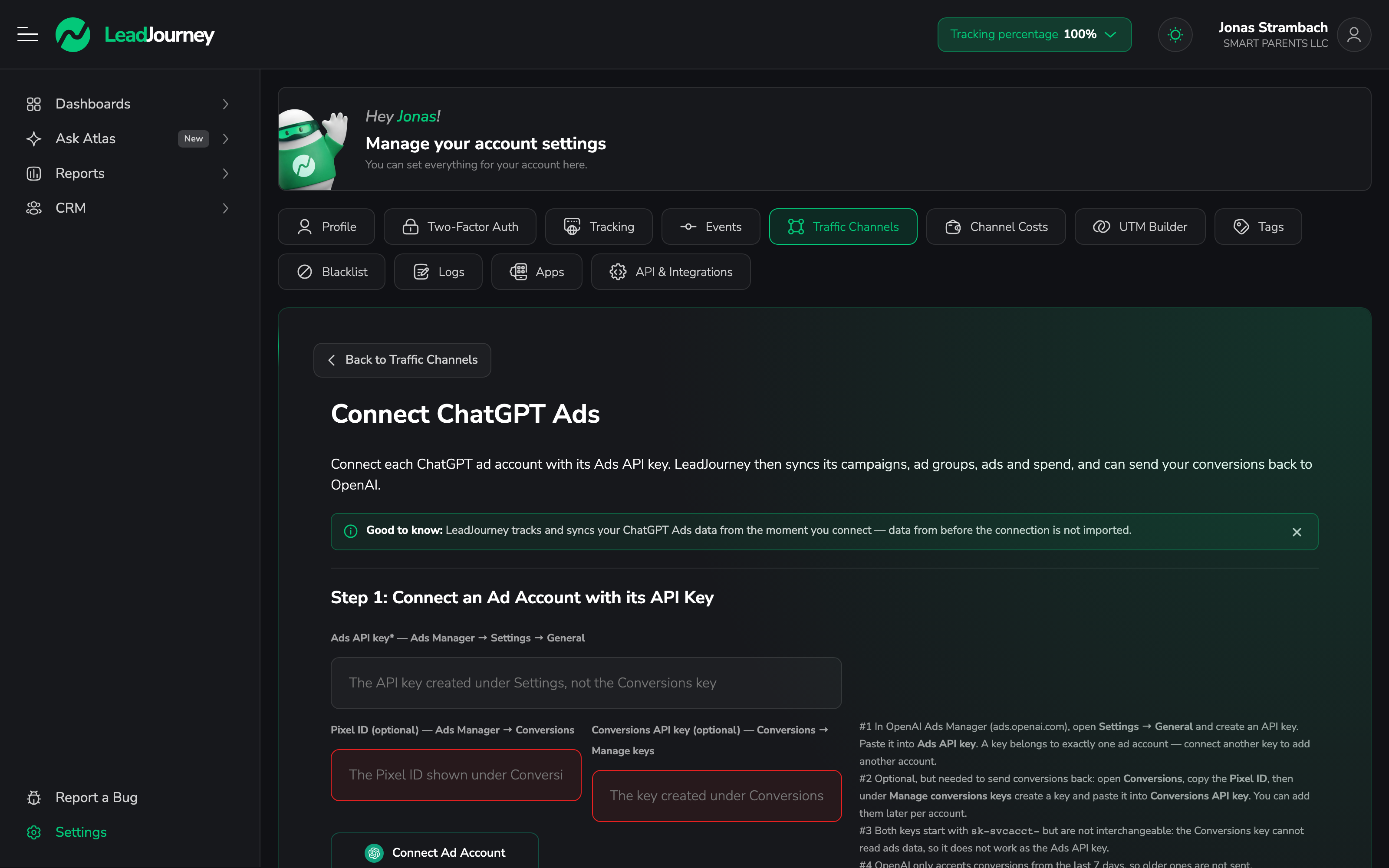
In OpenAI Ads Manager, open Settings → General and create an API key. Paste it into Ads API key and click Connect Ad Account.
A key belongs to exactly one ad account. To add another account, use Add another account and paste that account's key.
Add the conversion keys (optional, but needed to send conversions back)
Two more fields sit next to the Ads API key:
- Pixel ID – in Ads Manager, open Conversions and copy the Pixel ID.
- Conversions API key – under Conversions → Manage conversions keys, create a key and paste it here.
You can add both later, per account. Without them, spend and performance still sync but nothing goes back to OpenAI.
The two keys look identical and are not interchangeable
Both start with sk-svcacct-. The Conversions key cannot read ads data, so pasting it into
the Ads API key field won't work – and the mistake is easy to make because the strings look the
same. Copy each one from its own screen: the Ads key from Settings → General, the Conversions
key from Conversions → Manage conversions keys.
Check the connected accounts
Step 2 – Connected Ad Account/s lists every account you've connected. Use Check Keys to verify the stored keys still work, and edit an account to add or replace its Conversions API key later. Leaving the Conversions key field empty keeps the one already stored.
Map events to ChatGPT Ads
Under Step 3 – Map Events to ChatGPT Ads, decide how each LeadJourney conversion is named when it goes back to OpenAI. Whether an event is sent back at all is controlled by its Send back to Ads? switch in the Events Manager.
OpenAI only accepts conversions from the last 7 days
Conversions older than seven days are not sent. For a long sales cycle this means the deal that closes three weeks after the click can't be reported back to OpenAI, even though LeadJourney still attributes it correctly in your own reports.
Add the tracking parameter
Copy the parameter string from Step 4:
lj_channel=chatgpt_ads&lj_c_id={campaign_id}&lj_as_id={ad_group_id}&lj_ad_id={ad_id}In Ads Manager, open each campaign → Edit campaign and paste it into Landing page query
parameters. OpenAI fills the {campaign_id}, {ad_group_id} and {ad_id} macros and appends
its own oppref click ID to every ad click.
This has to be done by hand for every new campaign
OpenAI's API cannot set the Landing page query parameters field, so LeadJourney can't apply it for you. Make it part of your campaign launch checklist – a campaign without it still spends, but its clicks arrive without a campaign attached.
Syncing starts when you connect
LeadJourney tracks ChatGPT Ads data from the moment you connect. Data from before the connection is not imported.
Troubleshooting
“Connect Ad Account” rejects the key
You're most likely pasting the Conversions API key into the Ads API key field. Both start
with sk-svcacct-, but only the key from Settings → General can read ads data.
Spend syncs, but clicks have no campaign
The Landing page query parameters field is empty on that campaign. Open it in Ads Manager and paste the string from Step 4 – it isn't inherited by new campaigns.
Conversions aren't reaching OpenAI
Check in this order: the account has a Pixel ID and a Conversions API key, the event's Send back to Ads? switch is on, and the conversion is younger than seven days. The API Postbacks log shows each attempt with its status.
Related articles
Connect Reddit Ads
Connect Reddit Ads with one sign-in. LeadJourney syncs spend and performance down to ad level, sends conversions back to Reddit, and auto-tags your campaign URLs so every click is attributed.
Connect Multiple Ad Accounts
You're not limited to a single ad account. Connect as many Meta, Google, LinkedIn and Microsoft (Bing) ad accounts as you need – all from one login per platform.